Seamless on-premise to AWS migration: Your ultimate guide.
March 11, 2026|7:19 AM
Unlock Your Digital Potential
Whether it’s IT operations, cloud migration, or AI-driven innovation – let’s explore how we can support your success.
Home /
Work /
Blogs /
Seamless on-premise to AWS migration: Your ultimate guide.
Understanding the Landscape of on-premise to aws migration
Moving from a traditional on-premises infrastructure to the cloud, specifically AWS (Amazon Web Services), represents a significant strategic shift for many organizations. This process, known as on-premise to aws migration, allows businesses to leverage scalable, flexible, and cost-effective cloud resources. It involves a meticulous transformation of IT operations, applications, and data from physical data centers to a virtualized cloud environment.
This comprehensive guide will walk you through the essential steps and considerations for a successful on-premise to aws migration. We will explore the benefits, challenges, strategies, and best practices involved in this crucial cloud adoption journey. Understanding each phase is vital for minimizing disruption and maximizing the advantages of the AWS cloud.
Why Consider on-premise to aws migration?
The decision to undertake an on-premise to aws migration is driven by a desire for enhanced agility and operational efficiency. AWS offers unparalleled scalability, allowing businesses to effortlessly adjust resources up or down based on demand. This eliminates the need for large upfront capital expenditures on hardware.
Furthermore, cloud adoption provides robust disaster recovery options and improved security postures, benefiting from AWS’s extensive compliance certifications. Moving to the cloud can significantly reduce operational overheads associated with maintaining physical servers and data centers. It also fosters innovation by providing access to a wide array of advanced services like machine learning, analytics, and serverless computing.
Common Challenges in Cloud Migration
While the benefits are compelling, on-premise to aws migration presents its own set of challenges that need careful planning. Legacy applications with tight coupling to existing hardware or specific operating systems can complicate the transition. Data migration, especially for large volumes of sensitive information, requires secure and efficient strategies.
Skills gaps within IT teams for cloud-native technologies and managing ongoing cloud costs are also frequent hurdles. Additionally, ensuring continuous business operation during the migration process is paramount to avoid downtime and maintain customer satisfaction. Addressing these challenges proactively is key to a smooth journey.
Crafting Your Cloud Migration Strategy
A well-defined cloud migration strategy is the bedrock of any successful on-premise to aws migration. This strategy needs to be tailored to your organization’s specific needs, applications, and business goals. It involves evaluating your existing infrastructure, identifying critical dependencies, and selecting the most appropriate migration approaches for each workload.
Without a clear roadmap, the migration process can become chaotic, costly, and inefficient. Therefore, investing time in strategic planning upfront is crucial for a streamlined transition to AWS. This stage lays the groundwork for all subsequent migration activities.
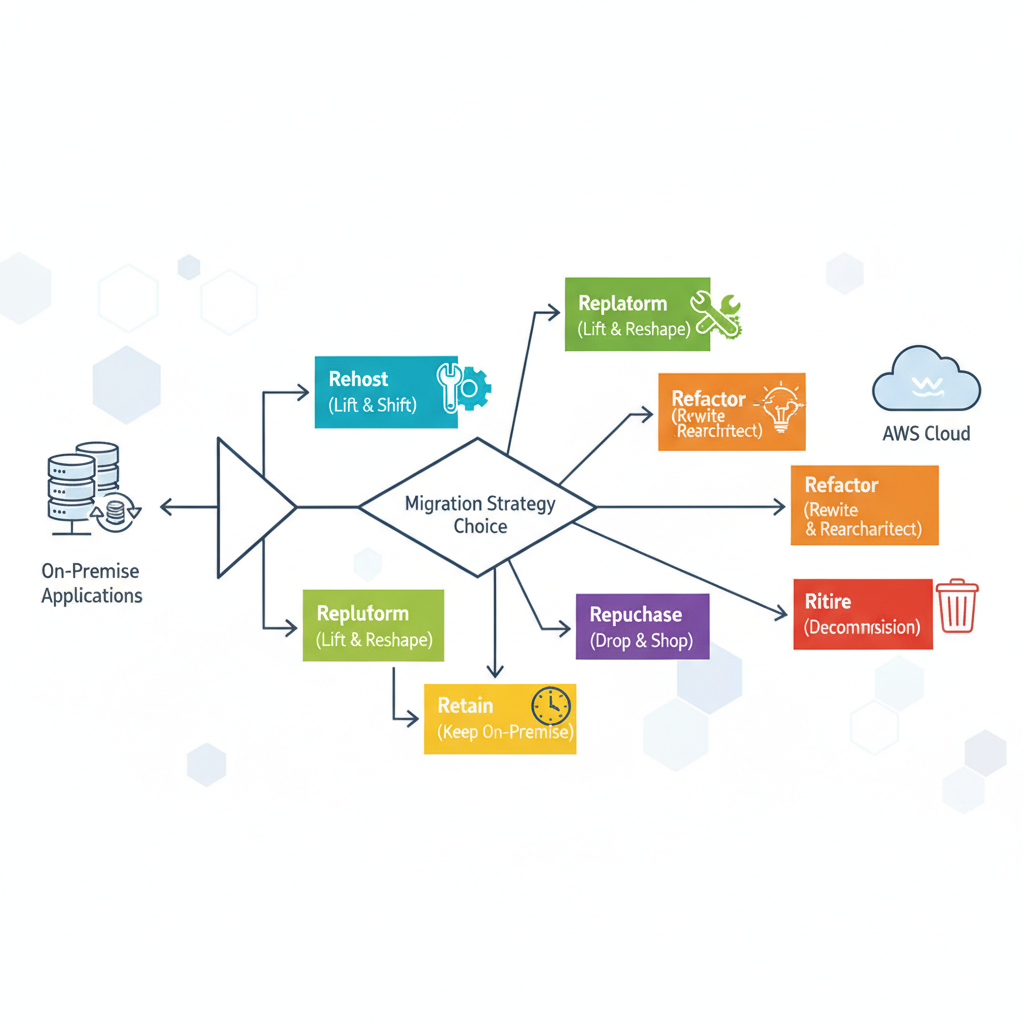
The Six R’s of Migration (Rehosting, Replatforming, Refactoring, etc.)
AWS outlines “The Six R’s” as a framework for classifying different cloud migration approaches. Each “R” offers a distinct path with varying levels of complexity and potential benefits. Understanding these options helps in making informed decisions about each application.
Rehost (Lift and Shift): This is the simplest approach, involving moving applications as-is from on-premises infrastructure to AWS. It requires minimal changes to the application architecture, offering a quick path to cloud adoption. While fast, it may not fully optimize for cloud benefits immediately.
Replatform (Lift, Tinker, and Shift): This approach involves making minor, cloud-optimized changes to an application before moving it. An example might be migrating an on-premise database to a managed AWS RDS instance, retaining the core application logic. It offers more benefits than rehosting without a complete rewrite.
Refactor/Rearchitect: This involves significantly modifying or redeveloping an application to fully leverage cloud-native features and services. This approach offers the most benefits in terms of scalability, resilience, and cost efficiency, but it is also the most complex and time-consuming. It typically targets microservices architectures or serverless functions.
Repurchase: Switching to a different product, often a SaaS (Software as a Service) offering, instead of migrating an existing application. For instance, replacing an on-premise CRM with a cloud-based Salesforce solution. This can reduce operational burdens significantly.
Retain: Deciding to keep certain applications or workloads on-premises, usually due to specific regulatory requirements, deeply integrated legacy systems, or recent hardware investments. This acknowledges that not everything needs to move to the cloud immediately.
Retire: Decommissioning applications that are no longer needed or used. This helps clean up the environment and reduces the scope of the migration effort, saving resources and costs.
A flowchart illustrating the AWS 6 R’s of migration strategies, showing paths from on-premise applications to different AWS migration outcomes like rehost, replatform, refactor, repurchase, retain, and retire.
Assessing Your Current on-premises infrastructure
Before any actual migration begins, a thorough assessment of your current on-premises infrastructure is essential. This discovery phase involves inventorying all applications, servers, databases, and network components. It also includes mapping dependencies between different systems.
Understanding resource utilization, performance metrics, and compliance requirements for each workload is critical. This assessment helps determine the complexity of migration for each application and informs the choice of the appropriate “R” strategy. Tools like AWS Application Discovery Service can automate much of this data collection.
The Phased Approach to on-premise to aws migration
An on-premise to aws migration is rarely a single, monolithic event. Instead, it’s best approached as a series of well-planned phases, typically moving from preparation to execution and finally to optimization. This phased approach allows for continuous learning, risk mitigation, and iterative improvements throughout the process. It ensures that the business can continue operations with minimal disruption.
Each phase has distinct goals and activities that contribute to the overall success of the cloud adoption journey. Breaking down the complex task into manageable stages makes the entire process more digestible and achievable for the organization.
Phase 1: Planning and Discovery
The initial phase is all about getting ready for the migration. It involves forming a dedicated cloud migration team, defining clear business objectives, and conducting a comprehensive assessment of your on-premises infrastructure. This is where you establish your cloud migration strategy, outlining which applications will move and how.
Key activities include identifying stakeholders, conducting a detailed inventory of all assets, analyzing application interdependencies, and determining security and compliance requirements. You’ll also define your target AWS architecture and estimate costs. This preparatory work is crucial for setting realistic expectations and timelines.
Phase 2: Migration Execution
This phase is where the actual on-premise to aws migration of applications and data takes place. Based on your chosen strategies (rehost, replatform, refactor), you will use appropriate AWS services and tools to move your workloads. It typically involves pilot migrations of non-critical systems first, followed by a broader rollout.
Data migration is a critical component here, utilizing services like AWS Data Migration Service (DMS) for databases or AWS Snowball for large data transfers. Testing is paramount at every step to ensure applications function correctly in the AWS environment. Cutover planning and execution are also carefully managed to minimize downtime.
Phase 3: Post-Migration Optimization and Operations
Once applications are successfully migrated to AWS, the journey shifts to optimization and ongoing operations. This phase focuses on fine-tuning your cloud environment for performance, cost efficiency, and security. It involves monitoring resource utilization, identifying opportunities for further cost savings, and implementing automation.
This phase also includes establishing new operational procedures and training your team on managing the AWS environment. Continuous improvement, security posture reviews, and leveraging new AWS services are ongoing activities. The goal is to fully realize the benefits of cloud adoption and maintain an optimized, secure, and resilient infrastructure.
✓ Free consultation ✓ No commitment required ✓ Trusted by experts
Key Considerations for a Successful on-premise to aws migration
Several critical aspects need careful attention throughout your on-premise to aws migration journey. Overlooking these can lead to unexpected challenges, increased costs, or security vulnerabilities. Addressing them proactively ensures a smoother transition and a more robust cloud environment.
From how you move your data to how you manage costs and ensure compliance, each consideration plays a vital role in the overall success. A holistic view and integrated approach are always recommended.
Data Migration Strategies and Tools
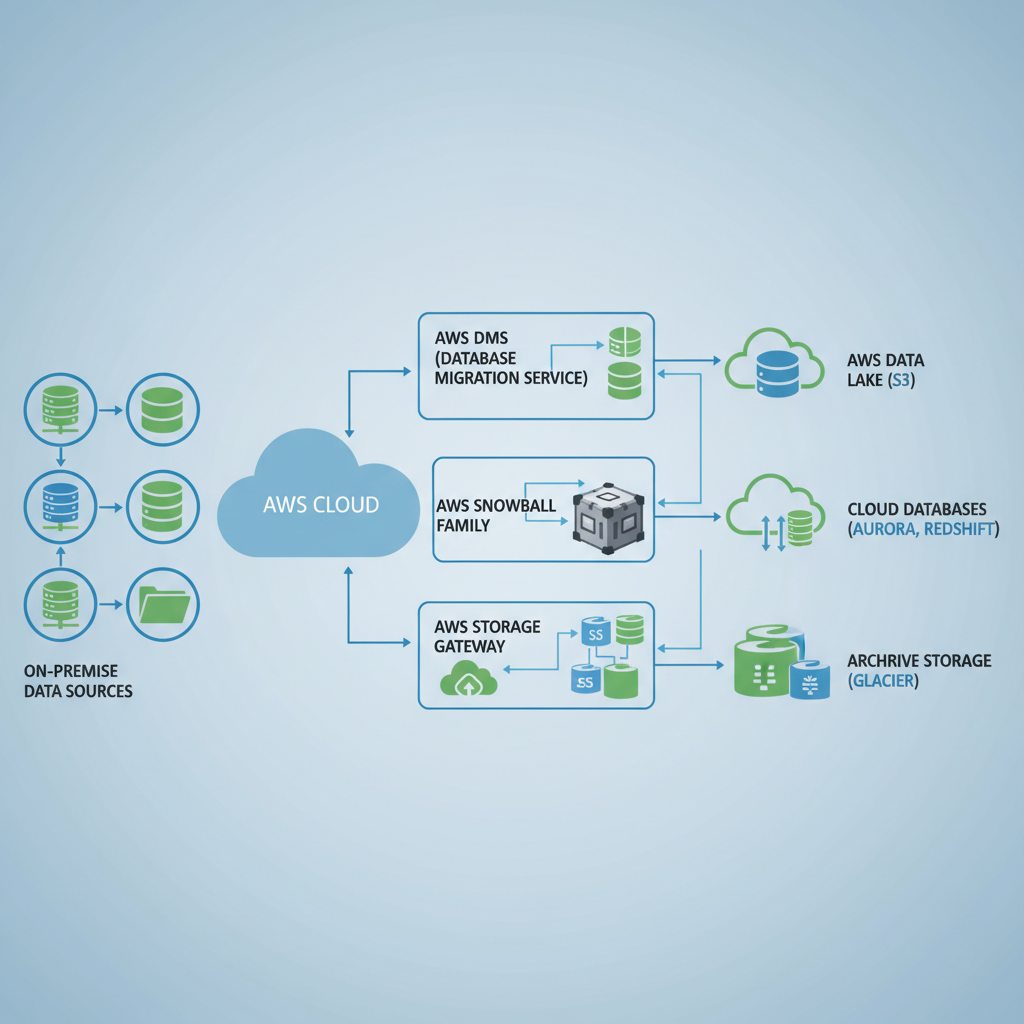
Data is often the most valuable asset, making data migration one of the most critical parts of an on-premise to aws migration. The strategy chosen depends on the volume, velocity, and sensitivity of your data. Large datasets may require offline transfers, while active databases demand continuous replication.
AWS offers a suite of services designed to facilitate data migration. AWS Data Migration Service (DMS) supports homogeneous and heterogeneous database migrations with minimal downtime. For massive data transfers, AWS Snow Family devices (Snowball Edge, Snowmobile) provide secure physical transfer. AWS Storage Gateway connects on-premises applications to cloud storage, simplifying hybrid cloud architectures.
A diagram showing various AWS data migration tools like AWS DMS, AWS Snowball, and Storage Gateway, illustrating how data moves from on-premise sources to AWS cloud storage and databases.
Security and Compliance in AWS
Security is a shared responsibility between AWS and the customer. AWS is responsible for the security of the cloud, while the customer is responsible for security in the cloud. This means you must properly configure your AWS services to protect your data and applications.
Implementing robust identity and access management (IAM), network security groups, and encryption for data at rest and in transit are crucial steps. AWS provides numerous tools like AWS WAF, Security Hub, and GuardDuty to enhance your security posture. Ensuring compliance with industry regulations (e.g., GDPR, HIPAA) also requires careful planning and configuration within your AWS environment.
Cost Management and Optimization
One of the primary drivers for on-premise to aws migration is often cost savings, but cloud costs can quickly spiral without proper management. It’s crucial to continuously monitor and optimize your AWS spending from day one. This involves right-sizing instances, utilizing reserved instances or savings plans for predictable workloads, and taking advantage of spot instances for fault-tolerant applications.
AWS Cost Explorer, AWS Budgets, and AWS Trusted Advisor provide tools to gain visibility into your spending and offer recommendations for optimization. Regularly reviewing your cloud resources and decommissioning unused assets are also vital practices for effective cost management.
Tools and Services for on-premise to aws migration
AWS offers a comprehensive ecosystem of tools and services specifically designed to assist with on-premise to aws migration. These services simplify complex tasks, automate processes, and provide guidance throughout your migration journey. Leveraging these native tools can significantly accelerate your cloud adoption.
Understanding the purpose and capabilities of each service helps in selecting the right ones for your specific migration needs. They cover discovery, planning, execution, and optimization phases of migration.
AWS Migration Services Overview
AWS provides a suite of purpose-built services to streamline your on-premise to aws migration.
AWS Application Migration Service (MGN): This service simplifies and accelerates replatforming and rehosting by automating the migration of physical, virtual, and cloud servers to AWS. It supports a wide range of operating systems and applications, providing minimal downtime.
AWS Database Migration Service (DMS): Facilitates the migration of databases to AWS quickly and securely. It supports both homogeneous and heterogeneous migrations, keeping source databases operational during the transfer.
AWS Server Migration Service (SMS): Automates the migration of on-premises VMware vSphere, Microsoft Hyper-V, and Azure virtual machines to AWS. It offers incremental replication, reducing the impact on your source environment.
AWS DataSync: Simplifies and accelerates the secure transfer of hundreds of terabytes and millions of files between on-premises storage and AWS storage services like Amazon S3, EFS, and FSx. It handles network optimizations, encryption, and data integrity verification.
AWS Snow Family: For moving extremely large amounts of data (petabytes to exabytes) physically into and out of AWS. This family includes Snowball Edge, Snowcone, and Snowmobile, offering various capacities and computing capabilities.
Third-Party Migration Tools
While AWS provides robust native tools, a thriving ecosystem of third-party migration tools also exists. These tools often offer specialized capabilities or integrate with existing enterprise management systems. They can provide additional features for assessment, planning, workload automation, and advanced data transformations.
Examples include tools for detailed application dependency mapping, performance monitoring during migration, or specialized database migration utilities. Choosing between native AWS tools and third-party solutions often depends on your existing technology stack, budget, and specific migration requirements. Thorough evaluation is key to making the best decision.
Best Practices for a Smooth Transition
Executing an on-premise to aws migration effectively requires adherence to proven best practices. These guidelines help mitigate risks, ensure efficiency, and ultimately lead to a more successful cloud adoption outcome. Ignoring these could lead to unforeseen issues and delays.
Embracing these practices from the outset will set your organization up for success and maximize the return on your cloud investment. They cover everything from initial planning to post-migration operations.
1. Start Small and Iterate: Begin with non-critical applications or proof-of-concept migrations to build experience and refine your processes. This iterative approach allows for learning and adjustments without impacting core business functions. 2. Automate Everything Possible: Leverage Infrastructure as Code (IaC) tools like AWS CloudFormation or Terraform to define and provision your AWS infrastructure. Automation reduces manual errors, speeds up deployments, and ensures consistency. 3. Prioritize Security from Day One: Design your AWS environment with security as a fundamental pillar. Implement least privilege access, encrypt data, configure network segmentation, and regularly audit your security posture. 4. Monitor Performance and Costs: Establish robust monitoring for application performance, resource utilization, and AWS spending from the moment you migrate. Use tools like Amazon CloudWatch and AWS Cost Explorer to keep track. 5. Invest in Team Training: Equip your IT staff with the necessary AWS skills and certifications. A well-trained team is crucial for managing and optimizing your cloud environment effectively after the migration. 6. Have a Rollback Plan: Always prepare a clear rollback strategy in case unexpected issues arise during the migration cutover. This minimizes downtime and risk. 7. Optimize for the Cloud, Don’t Just Rehost: While rehosting (lift and shift) can be a good starting point, continuously look for opportunities to replatform or refactor applications to fully leverage AWS services and achieve greater cost efficiency and resilience. 8. Engage Stakeholders Early: Ensure all relevant business units and stakeholders are informed and involved throughout the migration process. Clear communication helps manage expectations and secure support.
Frequently Asked Questions about on-premise to aws migration
This section addresses common questions individuals and organizations have when considering or undertaking an on-premise to aws migration.
What are the main benefits of on-premise to aws migration?
The primary benefits include increased agility, improved scalability, reduced operational costs, enhanced security capabilities, and access to a wide range of innovative AWS services. Organizations can respond faster to market changes and innovate more quickly.
How long does an on-premise to aws migration typically take?
The duration of an on-premise to aws migration varies significantly based on the complexity, size of the infrastructure, and the chosen migration strategies. It can range from a few weeks for smaller, simpler migrations to several months or even years for large enterprises with complex legacy systems. Thorough planning can help estimate timelines more accurately.
What is the “lift and shift” approach?
“Lift and shift,” also known as rehosting, is a migration strategy where applications and their data are moved from on-premises infrastructure to AWS with minimal or no changes. It’s often the fastest way to move to the cloud but may not fully optimize for cloud-native benefits immediately.
How do I handle data migration during the process?
Data migration involves moving databases, files, and other data stores from on-premises to AWS. This is typically done using AWS services like AWS Database Migration Service (DMS) for databases, AWS DataSync for large file transfers, or AWS Snow Family devices for petabyte-scale offline transfers. The specific strategy depends on data volume, type, and downtime tolerance.
What is the role of a cloud migration strategy?
A cloud migration strategy is a comprehensive plan that outlines the approach, tools, and processes for moving applications and data from on-premises to the cloud. It involves assessing the current environment, defining target architectures, choosing migration methods (like the 6 R’s), and planning for security, compliance, and cost management. It acts as a roadmap for the entire cloud adoption journey.
✓ Free consultation ✓ No commitment required ✓ Trusted by experts
Conclusion: Embracing the Cloud Future
An on-premise to aws migration is a transformative journey that can unlock significant value for your organization. By carefully planning, strategically executing, and continually optimizing, businesses can harness the immense power and flexibility of the AWS cloud. This move goes beyond mere infrastructure relocation; it’s about embracing a new paradigm of agility and innovation.
The path to cloud adoption involves navigating complexities, but with the right strategy, tools, and expertise, the benefits far outweigh the challenges. Embrace the future of computing with confidence, leveraging AWS to drive efficiency, enhance security, and accelerate your business growth.
Jacob Stålbro is a seasoned digitalization and transformation leader with over 20 years of experience, specializing in AI-driven innovation. As Head of Innovation and Co-Founder at Opsio, he drives the development of advanced AI, ML, and IoT solutions. Jacob is a sought-after speaker and webinar host known for translating emerging technologies into real business value and future-ready strategies.