Master Your Move: The Essential AWS Migration Checklist Explained
March 11, 2026|8:30 AM
Unlock Your Digital Potential
Whether it’s IT operations, cloud migration, or AI-driven innovation – let’s explore how we can support your success.
Home /
Work /
Blogs /
Master Your Move: The Essential AWS Migration Checklist Explained
The Indispensable Role of an AWS Migration Checklist
Migrating workloads to Amazon Web Services (AWS) can transform an organization’s IT landscape, offering scalability, flexibility, and cost efficiency. However, without a structured approach, this journey can become complex and fraught with challenges. A well-defined aws migration checklist serves as your essential roadmap, guiding you through every critical stage.
This comprehensive guide will detail the crucial steps and considerations for a successful AWS migration. It aims to equip you with the knowledge to navigate your cloud transition smoothly. By following a thorough aws migration checklist, you can minimize risks, optimize performance, and achieve your strategic cloud objectives.
Phase 1: Pre-Migration Readiness and Assessment
The initial phase of any successful migration is thorough preparation and assessment. This pre-migration checklist lays the groundwork, ensuring you fully understand your current environment and future needs. Skipping this critical readiness assessment can lead to unexpected issues later in the migration process.
Initial Discovery and Inventory
Begin by identifying all applications, databases, servers, and network components within your existing infrastructure. Create a comprehensive inventory of your on-premises assets. Documenting configurations, dependencies, and resource utilization provides a clear picture of what needs to be moved.
Understanding your current state is paramount for informed decision-making regarding your AWS migration strategy. This foundational step ensures no critical systems are overlooked during planning.
Workload Analysis and Dependencies
Analyze each workload’s characteristics, including CPU, memory, storage, and network requirements. Identify inter-application dependencies, as these relationships are crucial for determining migration groupings and sequences. Understanding these connections helps prevent service disruptions.
Prioritize workloads based on business criticality, complexity, and dependencies. This prioritization forms a planning checklist that dictates the migration order and resource allocation.
Security and Compliance Review
Assess your current security posture and identify any regulatory compliance requirements (e.g., GDPR, HIPAA, PCI DSS). Map these requirements to AWS security services and best practices. Establishing a robust security framework early is vital for maintaining data integrity and regulatory adherence in the cloud.
Ensure your team understands shared responsibility models in AWS, clarifying what AWS secures and what you are responsible for. This clarity prevents security gaps post-migration.
Network Assessment
Evaluate your current network architecture to ensure it can support the migration and ongoing operations in AWS. This includes bandwidth requirements, VPN/Direct Connect needs, and IP addressing schemes. A well-designed network is fundamental for seamless data transfer and application connectivity.
Consider latency, throughput, and security implications of your network design. A thorough network assessment is a key component of the overall pre-migration checklist.
Phase 2: Crafting Your AWS Migration Strategy
Once the initial assessment is complete, the next phase involves defining your migration strategy. This phase converts insights from the readiness assessment into a actionable plan. A detailed planning checklist is essential for a methodical approach.
Defining Migration Goals
Clearly articulate your business and technical objectives for migrating to AWS. Are you seeking cost reduction, increased agility, improved disaster recovery, or enhanced innovation capabilities? Specific, measurable goals will guide your entire migration process.
These goals provide criteria for success and help validate decisions throughout the project lifecycle. They form a critical part of your overall aws migration checklist guide.
Choosing Migration Strategies
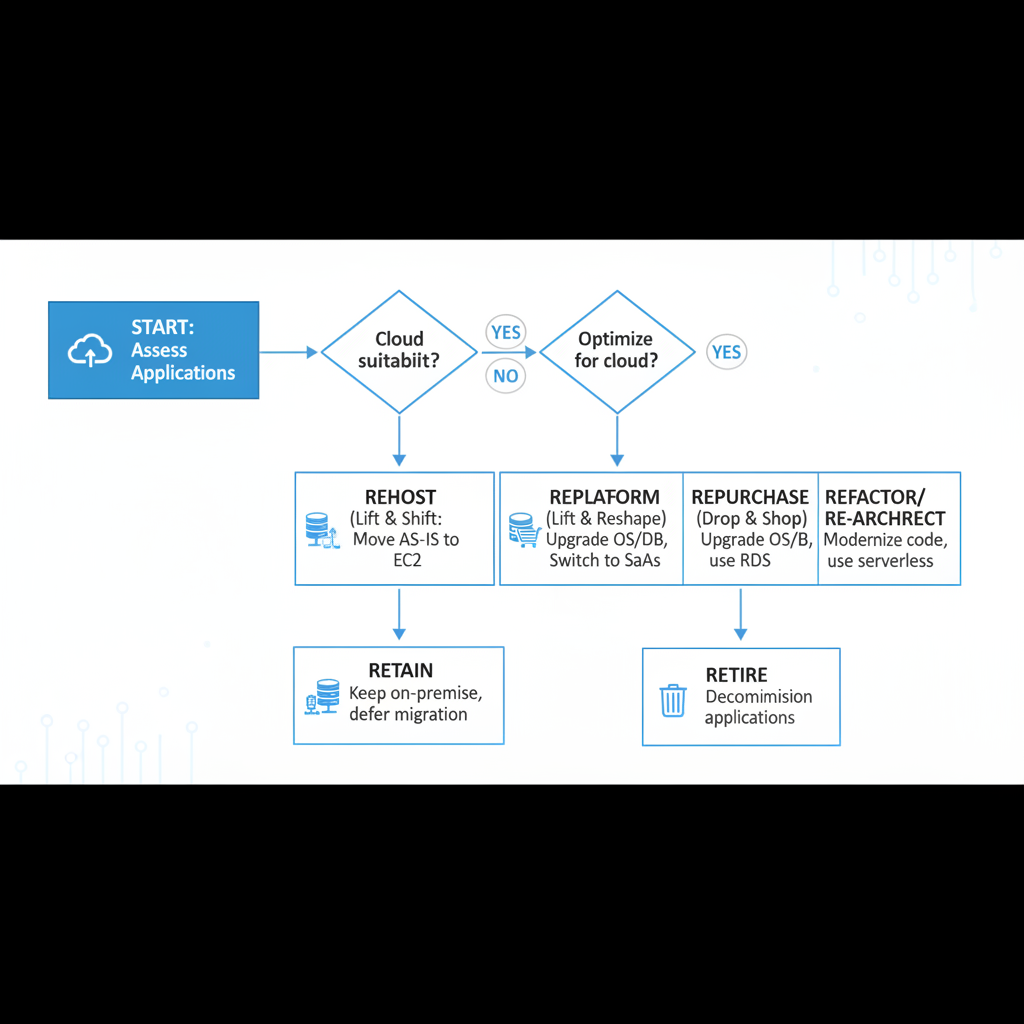
AWS outlines several common migration strategies, often referred to as the “6 Rs”: Rehost (lift and shift), Replatform (lift, tinker, and shift), Refactor/Rearchitect, Repurchase, Retain, and Retire. Select the most appropriate strategy for each workload based on its complexity, criticality, and your business goals.
Each strategy has different implications for effort, cost, and cloud-native optimization. A thoughtful selection minimizes disruption while maximizing benefits.
A flowchart illustrating the AWS 6 R’s migration strategies with brief descriptions for each, showing decision points for choosing between rehost, replatform, refactor, repurchase, retain, and retire.
Resource Planning and Budgeting
Estimate the AWS resources required for each migrated workload, including compute instances, storage, databases, and networking components. Develop a detailed budget that accounts for AWS service costs, migration tools, labor, and potential unforeseen expenses. Accurate budgeting prevents cost overruns.
Leverage AWS pricing calculators and cost explorer tools to refine your estimates. Understanding your projected spend is a vital part of your planning checklist.
Pilot Migration and Testing
Before a full-scale migration, consider performing a pilot migration of non-critical workloads. This allows you to test your migration tools, processes, and validate assumptions in a controlled environment. A pilot project provides invaluable learning experiences without risking core business operations.
Thorough testing of the migrated pilot workloads is crucial. This includes functional testing, performance testing, security testing, and user acceptance testing (UAT).
✓ Free consultation ✓ No commitment required ✓ Trusted by experts
Phase 3: Executing the Migration Tasks
With a solid strategy in place, this phase focuses on the actual execution of the migration. This involves a series of critical migration tasks, each requiring careful planning and oversight. Adhering to your aws migration checklist guide ensures consistency and reduces errors.
Data Migration
Implement a strategy for migrating your data to AWS, considering data volume, downtime tolerance, and data integrity. AWS offers various services like AWS DataSync, AWS Snowball, and AWS Database Migration Service (DMS) to facilitate this process. Choose tools that align with your specific data types and requirements.
Ensure data encryption in transit and at rest. Perform checksum verification to confirm data integrity post-migration.
Application Migration
Begin migrating applications based on your chosen strategy (rehost, replatform, refactor). This involves moving application code, configurations, and dependencies. Use automation tools where possible to streamline the process and reduce manual errors.
Coordinate application migration with data migration to minimize downtime and ensure consistency. Validate connectivity between application components in AWS.
Security Configuration
Configure AWS security services such as AWS Identity and Access Management (IAM), Security Groups, Network Access Control Lists (NACLs), and AWS WAF. Implement robust logging and monitoring with AWS CloudTrail and Amazon CloudWatch. Continuously enforce your security policies within the AWS environment.
Adhere to the principle of least privilege for all IAM roles and users. This proactive security approach is a key part of any best aws migration checklist.
Performance Tuning
Optimize migrated workloads for performance and cost effectiveness in AWS. This might involve right-sizing instances, optimizing database queries, or leveraging AWS-specific services like Amazon ElastiCache. Regularly review performance metrics to identify areas for improvement.
Initial migration often provides an opportunity to refine existing architectures. Proactive tuning can significantly enhance user experience and resource utilization.
Phase 4: Post-Migration Validation and Optimization
The migration isn’t complete once applications are running in AWS. This phase is crucial for ensuring everything works as expected and optimizing the environment. A detailed post-migration checklist helps confirm the success of your efforts.
Comprehensive Verification Steps
After each workload migration, perform extensive testing to validate functionality, performance, and security. This includes functional testing, load testing, disaster recovery testing, and user acceptance testing (UAT). Compare performance metrics against baseline measurements taken pre-migration.
Confirm all integrations and dependencies are fully operational in the AWS environment. These verification steps are non-negotiable for a successful cutover.
A dashboard showing various performance metrics like CPU utilization, network I/O, and database latency for applications running in AWS, with green checkmarks indicating healthy status.
Performance Monitoring and Tuning
Establish continuous monitoring using AWS CloudWatch, Amazon Kinesis, and other monitoring tools. Set up alerts for critical thresholds to proactively identify and address performance bottlenecks or potential issues. Regular monitoring helps maintain optimal performance.
Based on monitoring data, continue to fine-tune resource allocation and configurations. This iterative process ensures your AWS environment remains efficient and responsive.
Cost Optimization
Regularly review your AWS billing reports and cost explorer data to identify areas for cost savings. Implement strategies such as rightsizing instances, utilizing Reserved Instances (RIs) or Savings Plans, and deleting unused resources. Cost optimization is an ongoing process in the cloud.
Leverage AWS services like AWS Cost Explorer and AWS Budgets to gain visibility and control over your spending. This is a critical item on your post-migration checklist.
Documentation and Knowledge Transfer
Update all relevant documentation, including architecture diagrams, network configurations, and operational procedures, to reflect the new AWS environment. Conduct knowledge transfer sessions with your operations team to ensure they are proficient in managing and troubleshooting workloads in AWS. Thorough documentation supports long-term operational excellence.
This step ensures operational continuity and reduces reliance on migration specialists. It’s a key element of comprehensive aws migration checklist tips.
Phase 5: Go-Live and Continuous Improvement
The final phase involves the actual cutover to the new AWS environment and establishing processes for continuous improvement. This go-live checklist is your final assurance of a smooth transition.
Final Cutover Planning
Develop a detailed cutover plan that includes specific timelines, responsibilities, and communication protocols. Plan for a staggered cutover if possible to minimize risk. Ensure all stakeholders are aware of the cutover schedule and potential impacts.
Have rollback plans clearly defined in case of unforeseen issues during the cutover. Being prepared for contingencies is crucial.
Incident Response and Rollback Plans
Establish clear incident response procedures for managing issues post-go-live. Define escalation paths and communication strategies. Crucially, have well-tested rollback plans in place to revert to the previous on-premises environment if necessary.
Regularly review and update these plans. They provide a safety net and instill confidence during the final stages of migration.
Ongoing Management and Automation
Implement automation wherever possible for routine operational tasks, infrastructure provisioning, and scaling using services like AWS CloudFormation, AWS Lambda, and AWS Systems Manager. Automating operations enhances efficiency and reduces manual effort.
Continuous improvement is key in the cloud. Regularly review new AWS services and features that could further optimize your environment.
Best Practices and Essential Tips for Your AWS Migration Checklist
Successful AWS migrations often share common characteristics rooted in best practices. Incorporating these into your strategy can significantly improve outcomes. These aws migration checklist tips are designed to enhance efficiency and effectiveness.
Start Small and Iterate: Begin with less critical workloads to gain experience and refine your processes before tackling complex systems. This incremental approach reduces overall risk.
Prioritize Automation: Leverage Infrastructure as Code (IaC) tools like AWS CloudFormation from the outset. Automation ensures consistency, reduces errors, and speeds up deployments.
Invest in Training: Ensure your team has the necessary AWS skills. Comprehensive training empowers your staff to effectively manage and optimize the cloud environment post-migration.
Engage Stakeholders Early: Involve business leaders, application owners, and IT teams from the planning stages. Their input and buy-in are crucial for a smooth transition.
Monitor and Optimize Continuously: Cloud migration is not a one-time event. Establish processes for ongoing monitoring, performance tuning, and cost optimization to fully realize the benefits of AWS.
Document Everything: Maintain clear and current documentation throughout the migration process. This aids in troubleshooting, onboarding new team members, and ensuring operational continuity.
Test, Test, Test: Never underestimate the importance of rigorous testing at every stage. This includes functional, performance, security, and disaster recovery testing.
Leverage AWS Expertise: Consider engaging AWS Professional Services or an AWS Partner. Their experience with numerous migrations can provide invaluable guidance and accelerate your journey. Adhering to these principles will help you create the best aws migration checklist for your organization.
Frequently Asked Questions (FAQ)
What is an aws migration checklist?
An aws migration checklist is a structured guide outlining all the necessary steps, tasks, and considerations for successfully moving applications, data, and infrastructure from on-premises environments or other clouds to Amazon Web Services. It helps organizations plan, execute, and validate their cloud migration journey. This comprehensive tool ensures no critical steps are missed, minimizing risks and maximizing the benefits of cloud adoption.
Why is a pre-migration checklist important?
A pre-migration checklist is crucial because it establishes a foundational understanding of the existing environment before any migration tasks begin. It involves detailed discovery, dependency mapping, security assessments, and resource analysis. This preparatory phase identifies potential challenges, informs migration strategies, and helps create realistic timelines and budgets, thereby preventing costly issues and delays later in the process.
What are the key stages of an AWS migration?
The key stages of an AWS migration typically include assessment, planning, migration, and optimization. Assessment involves inventorying existing infrastructure and analyzing workloads. Planning defines migration goals and strategies. The migration phase executes the actual data and application transfers. Finally, optimization focuses on validating performance, managing costs, and refining the cloud environment post-migration.
How can I ensure data integrity during migration?
Ensuring data integrity during an AWS migration involves several critical practices. These include using reliable data migration services like AWS DataSync or AWS DMS, encrypting data both in transit and at rest, performing checksum verifications after data transfer, and meticulously validating the migrated data against the source. Implementing robust backup and recovery strategies is also essential to protect against data loss.
What should a post-migration checklist include?
A post-migration checklist should include comprehensive verification steps to confirm successful functionality, performance, and security of migrated workloads in AWS. It also covers continuous monitoring, cost optimization, and ongoing performance tuning. Furthermore, it should include updating documentation, conducting knowledge transfer sessions, and establishing incident response and rollback procedures for ongoing operational excellence.
How long does an AWS migration typically take?
The duration of an AWS migration varies significantly depending on several factors. These factors include the complexity and volume of workloads, the chosen migration strategy, the level of automation implemented, and the expertise of the migration team. Small, straightforward migrations might take weeks, while large, complex enterprise migrations with numerous applications and petabytes of data can extend over several months or even a year.
✓ Free consultation ✓ No commitment required ✓ Trusted by experts
Conclusion: Your Blueprint for a Seamless AWS Journey
Embarking on an AWS migration is a significant undertaking that offers immense potential for innovation and efficiency. The journey, however, demands meticulous planning and execution. By diligently following a well-structured aws migration checklist, organizations can navigate these complexities with confidence and precision.
This guide provides a robust framework, from initial assessment to post-migration optimization. Embracing a systematic approach, coupled with continuous learning and adaptation, will not only ensure a successful transition but also empower your organization to fully harness the transformative power of the cloud. Make your aws migration checklist the cornerstone of your cloud adoption strategy for a truly seamless and rewarding experience.
Jacob Stålbro is a seasoned digitalization and transformation leader with over 20 years of experience, specializing in AI-driven innovation. As Head of Innovation and Co-Founder at Opsio, he drives the development of advanced AI, ML, and IoT solutions. Jacob is a sought-after speaker and webinar host known for translating emerging technologies into real business value and future-ready strategies.