Master Your Cloud Move with Essential AWS Migration Tools
March 11, 2026|7:42 AM
Unlock Your Digital Potential
Whether it’s IT operations, cloud migration, or AI-driven innovation – let’s explore how we can support your success.
Home /
Work /
Blogs /
Master Your Cloud Move with Essential AWS Migration Tools
Introduction to AWS Migration Tools
Migrating to the cloud has become a strategic imperative for businesses seeking agility, scalability, and cost efficiency. Amazon Web Services (AWS) stands as a leading cloud provider, offering a comprehensive suite of services and specialized aws migration tools designed to streamline this complex transition. Understanding these tools is fundamental for any successful cloud adoption strategy.
This how-to guide will provide a practical overview of the best aws migration tools, demonstrating how to leverage them effectively. We will explore various migration services, offering tips and insights for a seamless journey to the AWS cloud. Whether you are moving applications, databases, or entire data centers, the right set of tools can make all the difference.
Understanding the AWS Migration Process
A successful migration to AWS is not merely about moving data; it involves a well-planned, phased approach. AWS recommends a structured framework to ensure all aspects of the migration are addressed, minimizing risks and maximizing benefits. This systematic approach is crucial for large-scale application migration efforts.
The typical migration process encompasses several key phases, starting long before any actual data transfer begins. Each phase utilizes specific strategies and often relies on different migration services to achieve its objectives. Proper planning in the initial stages can significantly reduce complexities later on.
The AWS migration process typically includes:
Assess: Evaluating your current IT environment, identifying applications, dependencies, and performance requirements. This phase helps determine the scope and complexity of your migration.
Mobilize: Building the foundational infrastructure on AWS, establishing security, networking, and accounts. This phase also involves creating a migration plan and refining the business case.
Migrate: Executing the actual transfer of data, applications, and servers using various aws migration tools. This is where the bulk of the technical work happens.
Modernize: Optimizing migrated workloads for cloud-native benefits, re-architecting applications, or adopting managed services. This phase transforms your infrastructure to fully leverage AWS capabilities.
Key AWS Migration Tools Explained
AWS provides a rich portfolio of migration tools, each designed to address specific aspects of your migration journey. These tools cover everything from initial discovery and planning to data transfer and application rehosting. Leveraging the right combination of these migration services is key to an efficient transition.
Let’s delve into some of the most critical aws migration tools and their primary functions. Understanding what each tool offers will help you craft an effective migration strategy tailored to your needs. This section will give you a solid foundation for utilizing these powerful capabilities.
AWS Migration Hub
AWS Migration Hub serves as a central hub for your migration projects, offering a single place to track the progress of application migrations across multiple AWS and partner solutions. It provides visibility into your entire migration portfolio, making it an indispensable component of any large-scale move. You can monitor the status of your servers and databases as they migrate.
It integrates with other aws migration tools like AWS Application Discovery Service and AWS Server Migration Service, consolidating their data. This centralized dashboard simplifies project management and gives you a holistic view of your application migration efforts. AWS Migration Hub helps coordinate complex migrations effectively.
AWS Application Discovery Service
Before you can migrate, you need to know what you have. AWS Application Discovery Service helps you gather detailed information about your on-premises servers, including application dependencies, network connections, and performance data. This critical data fuels your migration planning and assessment phase.
The service can use agent-based or agentless discovery methods to collect data from your environment. This information is then exported to AWS Migration Hub, allowing you to categorize applications and plan their migration waves. It’s a foundational tool for any comprehensive aws migration tools guide.
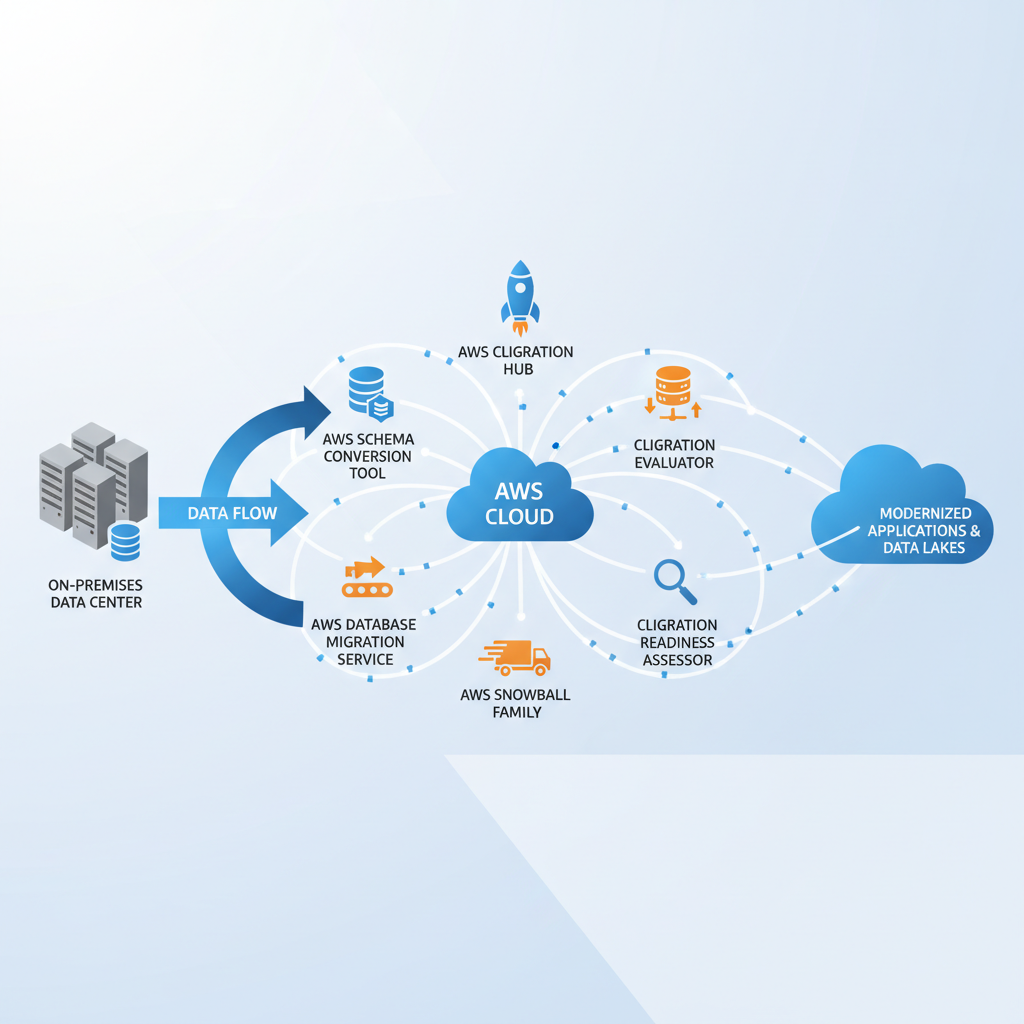
A dashboard showing various AWS migration tools and their interconnections, with data flow from on-premises to AWS cloud.
AWS Server Migration Service
AWS Server Migration Service (SMS) is designed to simplify the migration of on-premises workloads to AWS. It automates the migration of server operating systems, applications, and data from your source environment to AWS EC2 instances. This service handles the rehosting aspect, often referred to as “lift and shift.”
SMS supports incremental replication, meaning it only transfers changed data blocks after the initial full replication. This significantly reduces network bandwidth usage and minimizes downtime during cutover. It’s one of the best aws migration tools for moving virtualized servers with minimal disruption.
AWS Database Migration Service
Databases are often critical components of any IT infrastructure, and their migration requires specialized handling. AWS Database Migration Service (DMS) enables you to migrate relational databases, data warehouses, NoSQL databases, and other data stores to AWS quickly and securely. It supports both homogeneous and heterogeneous migrations.
Homogeneous migrations involve moving databases between the same database engines, for example, Oracle to Oracle. Heterogeneous migrations involve moving between different database engines, such as Oracle to Amazon Aurora or Microsoft SQL Server to Amazon RDS for PostgreSQL. DMS handles the complexity of schema conversion and continuous replication.
CloudEndure Migration
CloudEndure Migration, an AWS company, provides continuous block-level replication of your servers into a staging area in your AWS account. This technology minimizes downtime during the actual cutover to mere seconds, making it ideal for critical applications. It is often cited in aws migration tools tips for its robust replication capabilities.
CloudEndure supports migration from physical, virtual, and cloud environments to AWS. It simplifies the process by automating server conversions and ensuring data consistency. Its ability to perform test migrations without impacting production systems is a significant advantage for validating your migration strategy.
AWS DataSync
Transferring large volumes of data from on-premises storage to AWS can be a bottleneck. AWS DataSync is a data transfer service that simplifies, automates, and accelerates moving data between on-premises storage systems and AWS storage services like Amazon S3, Amazon EFS, and Amazon FSx. It uses an optimized network protocol for faster transfers.
DataSync manages the entire transfer process, including encryption, integrity validation, and network optimization. This reduces the administrative overhead and frees up resources that would otherwise be spent on manual data copying. It’s a highly effective tool for high-speed, large-scale data ingestion.
AWS Snow Family
For extremely large data migrations, especially those with network constraints, the AWS Snow Family offers physical devices to securely transfer petabytes of data into and out of AWS. This family includes Snowcone, Snowball, and Snowmobile, providing various capacities for offline data transfer. These are robust aws migration tools for specific scenarios.
The Snowball Edge devices also offer on-board compute and storage capabilities for edge computing use cases. This allows for data processing closer to the source before transfer. When internet connectivity is limited or prohibitively expensive, the Snow Family provides a reliable alternative.
AWS Transfer Family
The AWS Transfer Family provides fully managed support for transferring files directly into and out of Amazon S3 and Amazon EFS using SFTP, FTPS, and FTP protocols. This eliminates the need to manage your own file transfer servers, simplifying data exchange with partners or internal systems. It is an often-overlooked but crucial tool for secure file transfers.
This service integrates seamlessly with existing identity providers and provides a highly available, scalable, and secure file transfer solution. It’s particularly useful for organizations that rely heavily on traditional file transfer protocols for business-critical workflows. The Transfer Family significantly reduces operational overhead.
✓ Free consultation ✓ No commitment required ✓ Trusted by experts
Choosing the Right AWS Migration Tools
Selecting the appropriate aws migration tools is a critical step in planning your cloud journey. The choice depends on several factors, including the type of workload, data volume, acceptable downtime, complexity of dependencies, and budget. A careful evaluation helps you optimize both cost and efficiency.
Consider these factors when determining the best aws migration tools for your project:
Workload Type: Are you migrating databases, virtual machines, applications, or large datasets? Different tools excel in different areas.
Data Volume and Velocity: For petabytes of data, physical transfer devices like AWS Snowball might be more practical than network transfers. For continuous, high-volume data streams, DataSync or DMS are better.
Downtime Tolerance: Critical applications require tools like CloudEndure Migration or DMS with continuous replication to minimize cutover downtime. Less critical applications might tolerate longer outages.
Complexity and Dependencies: Tools like AWS Application Discovery Service are essential for mapping complex application dependencies. AWS Migration Hub helps orchestrate these complex moves.
Cost: While many AWS migration tools offer free tiers or pay-as-you-go pricing, understand the total cost of ownership for each solution, including compute, storage, and data transfer.
Skill Set: Consider the expertise of your team. Some tools might require more specialized knowledge than others.
A Step-by-Step Guide to Using AWS Migration Tools
Migrating to AWS involves a structured process that leverages various tools at different stages. This aws migration tools guide outlines a general step-by-step approach to ensure a smooth transition. Following these steps systematically will help manage complexity.
Step 1: Assessment and Planning
Begin by thoroughly assessing your current IT environment. Utilize AWS Application Discovery Service to gather detailed information about your on-premises servers, applications, and dependencies. This data informs your migration strategy. Develop a comprehensive migration plan, identifying applications to move, defining migration waves, and estimating costs.
Step 2: Preparing Your AWS Environment
Establish your target AWS environment. This includes setting up Virtual Private Clouds (VPCs), subnets, security groups, and identity and access management (IAM) roles. Prepare necessary S3 buckets or database instances where your migrated data and applications will reside. Ensure your networking configuration allows connectivity between your on-premises environment and AWS.
Step 3: Executing the Migration
Based on your plan, begin migrating your workloads.
For servers: Use AWS Server Migration Service (SMS) for virtual machine rehosting or CloudEndure Migration for block-level replication with minimal downtime.
For databases: Deploy AWS Database Migration Service (DMS) to migrate your databases, handling schema conversion for heterogeneous migrations and continuous replication.
For large data sets: Use AWS DataSync for online transfers or AWS Snow Family devices for offline transfers of petabytes of data.
Step 4: Testing and Validation
After migration, rigorously test your applications and data in the AWS environment. Verify functionality, performance, and data integrity. Use AWS Migration Hub to monitor the status of your migrations and ensure all components have successfully transitioned. Address any issues identified during this phase before proceeding to cutover.
Step 5: Cutover and Post-Migration
Once testing is complete and successful, perform the cutover. This involves redirecting traffic from your on-premises systems to the newly migrated AWS environment. After cutover, decommission your old on-premises resources. Continuously monitor your AWS workloads, optimize for cost and performance, and explore modernization opportunities with cloud-native services.
Best Practices for a Successful AWS Migration
Beyond simply knowing the aws migration tools, adhering to best practices is crucial for a successful and cost-effective migration. These tips apply to all types of migration services and can significantly impact the outcome. Implementing these strategies will enhance security, performance, and operational efficiency.
Start Small: Begin with a pilot migration of a non-critical application or workload. This helps your team gain experience with the aws migration tools and processes without risking core business operations.
Automate Everything: Leverage AWS services like AWS CloudFormation and AWS Systems Manager to automate environment provisioning, configuration, and operational tasks. Automation reduces manual errors and speeds up the migration process.
Prioritize Security: Implement security best practices from day one. Use AWS IAM for granular access control, configure security groups and network ACLs, and encrypt data at rest and in transit.
Optimize for Cost: Continuously monitor your AWS spending using AWS Cost Explorer and implement cost-saving measures. Identify idle resources, right-size instances, and consider reserved instances or savings plans.
Plan for Data Transfer: Understand your data transfer requirements and choose the most efficient aws migration tools. Account for bandwidth, latency, and data integrity during the planning phase.
Validate and Test Thoroughly: Never skip comprehensive testing. Validate application functionality, performance, and data consistency in the AWS environment before cutover. This prevents unexpected issues after go-live.
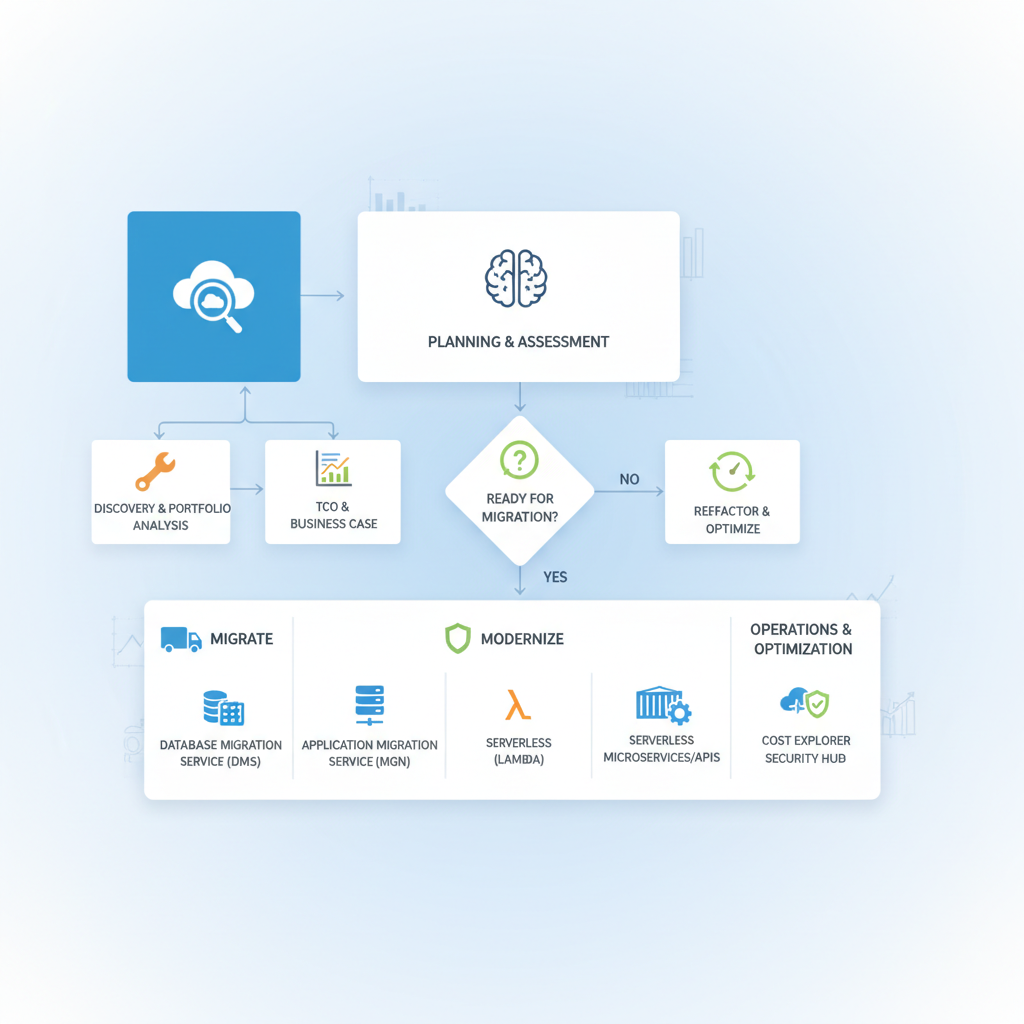
A flowchart illustrating the different stages of an AWS migration project, with arrows showing decision points and recommended tools for each stage.
Troubleshooting Common Migration Challenges
Even with the best aws migration tools and a meticulous plan, challenges can arise during the migration process. Being prepared to troubleshoot common issues can save significant time and effort. Understanding potential roadblocks helps in proactive planning.
Network Latency and Bandwidth: Slow data transfers often point to network constraints. Investigate network configurations, utilize AWS Direct Connect or VPN solutions for dedicated connectivity, and ensure sufficient bandwidth. AWS DataSync can help optimize transfer speeds.
Application Compatibility: Some legacy applications may not be compatible with cloud environments or specific AWS services. Consider refactoring, re-platforming, or re-architecting these applications, or using a “lift and shift” approach with tools like AWS Server Migration Service for minimal changes.
Data Integrity Issues: Ensure data consistency throughout the migration. Tools like AWS Database Migration Service include built-in validation features. Perform checksums and data reconciliation checks after migration.
Security and Compliance Gaps: Misconfigurations can lead to security vulnerabilities or compliance violations. Regularly review AWS security best practices, use AWS Config for compliance auditing, and ensure your IAM policies are correctly applied.
Unexpected Costs: Unplanned resource usage or data transfer fees can inflate costs. Continuously monitor costs with AWS Cost Explorer and tag resources appropriately for better cost allocation and analysis.
Resource Dependencies: Complex applications often have hidden dependencies. Thoroughly use AWS Application Discovery Service to map these before migration. Misidentified dependencies can cause application failures post-migration.
Frequently Asked Questions
What are the primary benefits of using aws migration tools?
The primary benefits include accelerated migration timelines, reduced manual effort, minimized downtime for critical applications, and enhanced data security and integrity. These tools streamline complex processes, making the journey to the cloud more efficient and less risky. They also help in managing the scope of application migration projects.
How does AWS Migration Hub help with the migration process?
AWS Migration Hub provides a central dashboard to track the progress of your application migrations across various AWS and partner services. It aggregates data from different aws migration tools, offering a unified view of your entire migration portfolio. This centralization aids in planning, monitoring, and managing complex migrations effectively.
Can AWS Database Migration Service handle different database types?
Yes, AWS Database Migration Service (DMS) is highly versatile and can handle both homogeneous and heterogeneous database migrations. It supports various database engines and can even facilitate migrations from on-premises to AWS cloud databases, even when moving between different database platforms like Oracle to PostgreSQL.
Is CloudEndure Migration suitable for minimizing downtime?
Absolutely, CloudEndure Migration is specifically designed to minimize downtime during server migrations. It uses continuous, block-level replication to a staging area in AWS, allowing for cutover with mere seconds of downtime. This makes it one of the best aws migration tools for mission-critical applications where high availability is paramount.
What are some tips for choosing the best aws migration tools for a specific project?
To choose the best aws migration tools, consider your workload type, data volume, acceptable downtime, and budget. Evaluate the complexity of your application migration, your team’s existing skill sets, and any regulatory compliance requirements. Starting with a clear assessment and planning phase will guide your tool selection.
✓ Free consultation ✓ No commitment required ✓ Trusted by experts
Conclusion
Migrating to the AWS cloud is a transformative journey that offers immense benefits, from enhanced agility to significant cost savings. The comprehensive suite of aws migration tools provided by AWS is designed to support every stage of this journey, from initial assessment to ongoing optimization. By understanding and effectively utilizing tools like AWS Migration Hub, AWS Database Migration Service, AWS Server Migration Service, and CloudEndure, businesses can achieve a smooth and successful transition.
This aws migration tools guide has provided insights into the various migration services available and offered practical tips for their application. Armed with this knowledge, you are better equipped to embark on your cloud migration, confident in your ability to leverage the power of AWS. Embrace these powerful migration tools to unlock the full potential of the cloud for your organization.
Jacob Stålbro is a seasoned digitalization and transformation leader with over 20 years of experience, specializing in AI-driven innovation. As Head of Innovation and Co-Founder at Opsio, he drives the development of advanced AI, ML, and IoT solutions. Jacob is a sought-after speaker and webinar host known for translating emerging technologies into real business value and future-ready strategies.